
The short answer
Choose the foreground color used for text and the background color behind it. ByteDip calculates their contrast ratio in the browser and shows whether the pair passes the normal- and large-text AA and AAA thresholds.
A ratio check is a useful pre-flight step for a button, label, heading, navigation item, or body copy. It is not a complete accessibility audit, so keep the result alongside checks for typography, focus states, layout, and the rest of the interface.
What a contrast ratio tells you
The ratio describes the difference in perceived luminance between two colors. Higher ratios make text easier to distinguish from its background, especially when text is small or the reader has reduced contrast sensitivity.
| Guidance | Normal text | Large text |
|---|---|---|
| AA | 4.5:1 or higher | 3:1 or higher |
| AAA | 7:1 or higher | 4.5:1 or higher |
The checker reports all four combinations so you can see where a pair passes and where it needs more separation. The large-text result is not a general exemption for any text that looks prominent; apply the relevant accessibility definition for your design and typography.
How to check color contrast
- Identify the foreground colorEnter the HEX value used for the text, icon, or other foreground element. Keep the value in the same sRGB color space as the design token you are reviewing.
- Identify the background colorEnter the opaque background color directly behind that element. If the element sits over a gradient or image, check each important part of the visual separately.
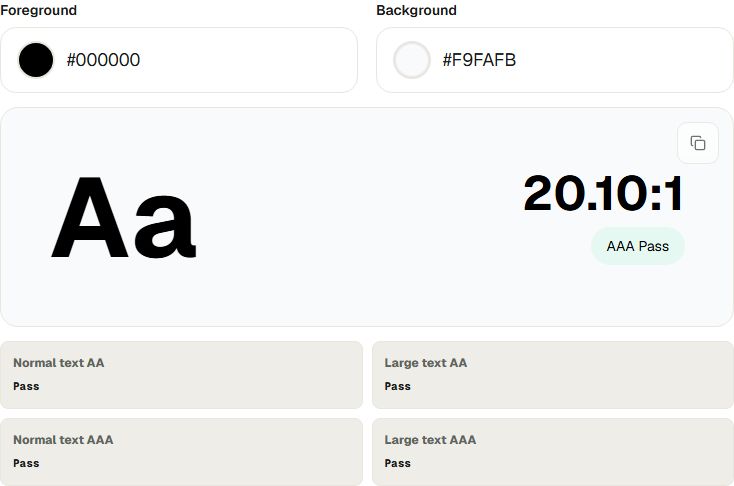
- Review the ratio and pass statesRead the ratio card and the four result cells for normal-text AA, large-text AA, normal-text AAA, and large-text AAA. The summary can be copied when you need to record the decision.
- Adjust and test againChange one color at a time until the intended threshold passes, then test the actual component with its font size, weight, hover state, focus state, and surrounding content.
A practical example
Foreground: #000000
Background: #F9FAFB
Contrast ratio: 20.10:1
This pair clears the AA and AAA thresholds shown by the tool for both normal and large text. The result is still one part of the review: confirm that the color is used consistently, that the text remains readable in every state, and that meaning is not communicated by color alone.
What the checker does not test
- It checks two opaque sRGB colors, not an entire page or component system.
- It does not inspect the actual font size, weight, line height, or rendering context of your interface.
- It does not evaluate focus indicators, error states, animations, images, gradients, or color-only meaning.
- A passing ratio does not by itself prove complete WCAG conformance.
Adjust the palette and check again
Use Color Converter when you need to inspect equivalent HEX, RGB, and HSL values while refining a token. Use Color Picker when you need to capture a color from the screen, or Gradient Generator when the background itself needs a new two-color CSS gradient.
Check a foreground and background pair locally with ByteDip’s Contrast Checker. Open the Contrast Checker