
The short answer
Choose a CSV file or paste tabular text into ByteDip’s CSV Viewer and Table Generator. Confirm the delimiter and header mode, inspect the searchable table, then export CSV, HTML, or Markdown when the data looks right.
The viewer displays values as text. It does not silently infer numbers or booleans, which keeps the inspection step predictable before you convert or hand the data to another system.
What to inspect first
- Are the expected columns present and named clearly?
- Did the delimiter produce the intended number of columns?
- Are quoted values, commas inside cells, or multiline fields being read as one value?
- Are blank rows or empty cells meaningful for the next system?
- Does a search for a known value find the rows you expect?
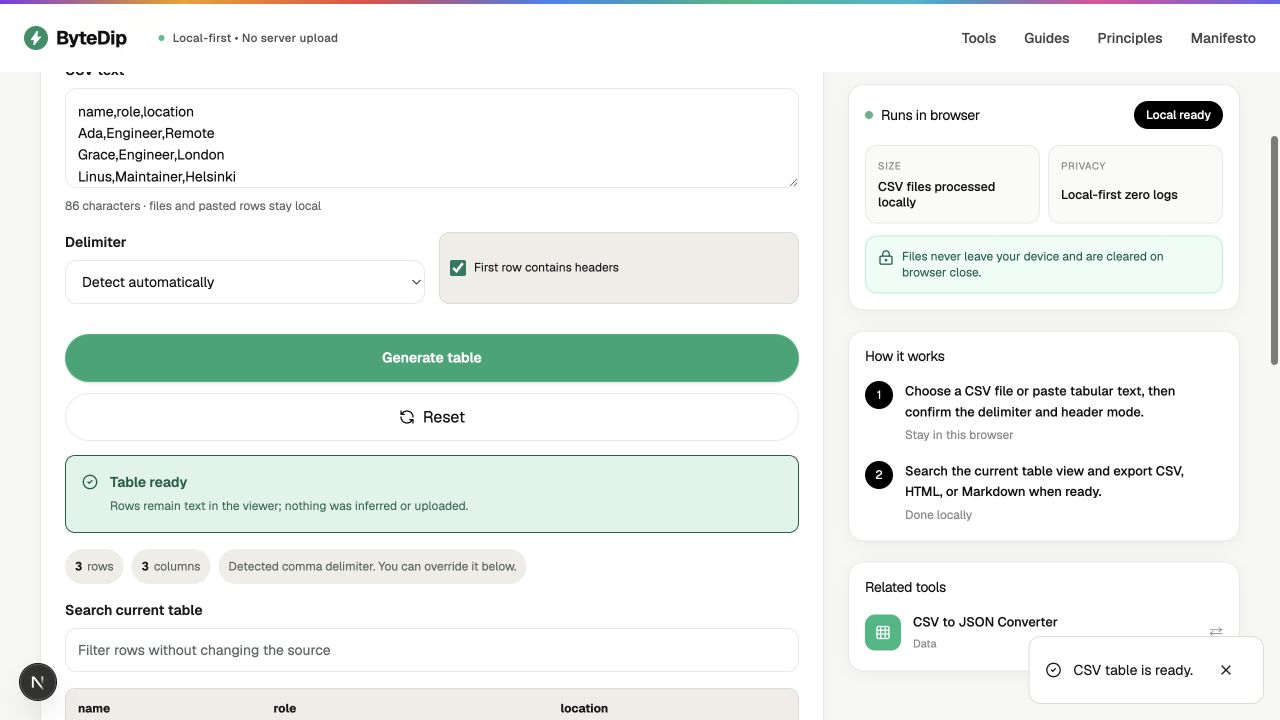
How to inspect a CSV locally
- Open or paste the dataChoose a CSV file or paste the text into the viewer. The file and rows stay in the current browser.
- Confirm the delimiter and headersCheck whether the source uses commas, tabs, semicolons, or another supported delimiter, then choose whether the first row is a header.
- Search the tableUse the current table search to find a value, a suspicious row, or a header before exporting anything.
- Export the representation you needKeep CSV for tabular interchange, HTML for a readable table, or Markdown for notes and documentation.
When to convert CSV to JSON
Use CSV to JSON Converter when the next step expects structured JSON rather than a human-readable table. Keep type conversion explicit; values remain strings by default so a ZIP code, identifier, or leading-zero value is not changed just because it looks numeric.