
The short answer
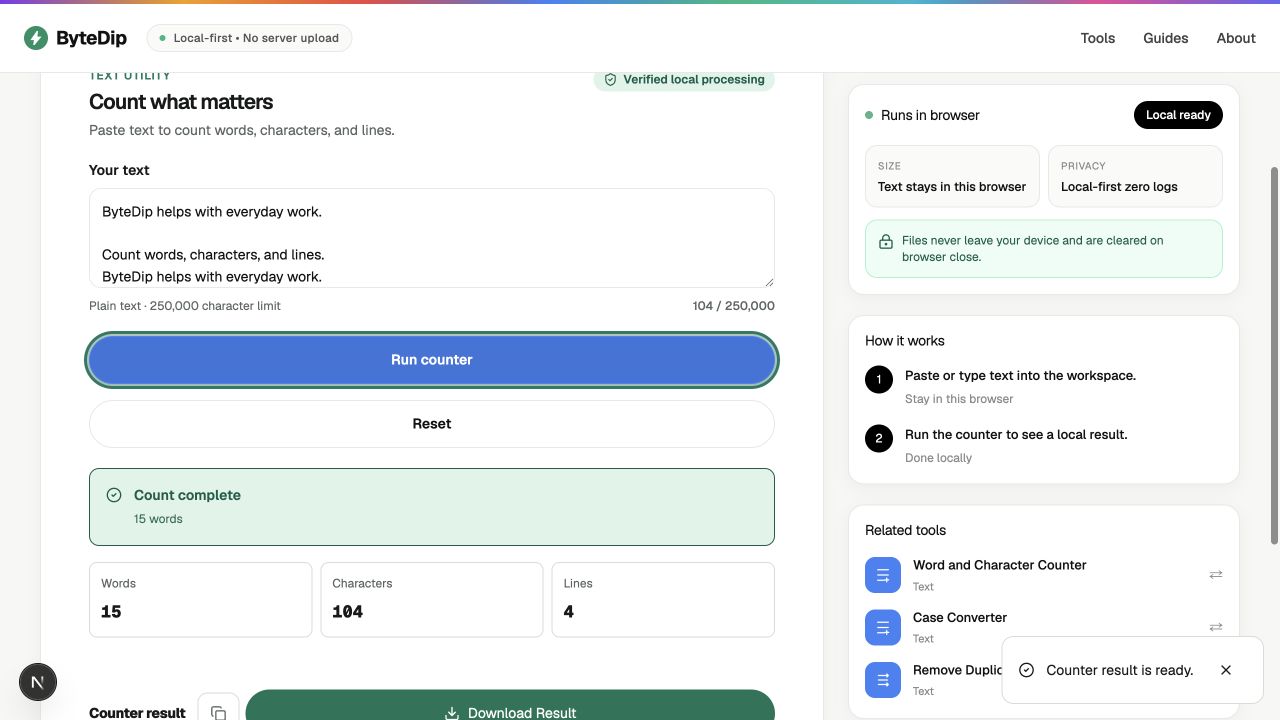
Paste or type your text into ByteDip’s Text Counter and choose Run counter. The result shows the number of words, characters, and lines. The supported text stays in the current browser tab instead of being uploaded to a server.
This is useful when you need a quick count for a form, article draft, caption, note, spreadsheet cell, or plain-text export and do not want to paste the content into a remote service.
What the Text Counter measures
- Words are counted from non-empty runs of whitespace-separated text.
- Characters use the text length available in the browser, including spaces and line breaks.
- Lines are counted from the text split at Windows or Unix line endings.
- The input limit is 250,000 characters per run.
How to count words, characters, and lines
- Copy or type the textBring the text from your draft, note, document, or spreadsheet into the Text Counter workspace. Keep the original copy until you have checked the totals.
- Run the counterChoose Run counter. ByteDip processes the text locally and displays the result without sending the input or result to a server.
- Review the three totalsCheck Words, Characters, and Lines. Spaces, punctuation, and line breaks remain part of the input used for the character and line totals.
- Copy or download the resultUse the result actions when you need a plain-text copy of the totals. You can reset the workspace and count another block afterward.
A small example
ByteDip helps with everyday work.

Count words, characters, and lines.
ByteDip helps with everyday work.
For this example, the counter reports 15 words, 104 characters, and 4 lines. The repeated sentence is still counted because Text Counter measures the text as provided; it does not remove duplicate lines automatically.
10,000 characters is how many words?
There is no fixed conversion because word length, spaces, punctuation, and line breaks vary. As a practical English-prose estimate, 10,000 characters is often around 1,670–2,000 words when an average word plus following space uses roughly 5–6 characters.
| Characters | Approximate words | Assumption |
|---|---|---|
| 1,000 | 167–200 | Typical English prose |
| 5,000 | 833–1,000 | Typical English prose |
| 10,000 | 1,667–2,000 | Typical English prose |
| 20,000 | 3,333–4,000 | Typical English prose |
Use the actual text rather than the estimate when a form, publication, or platform enforces a limit. ByteDip’s Text Counter gives the exact word and character totals for the text in your browser.
Need the exact total? Count words, characters and lines instantly with ByteDip’s Text Counter. Count words, characters and lines instantly
How many words are typically on a line?
A line does not have a universal word count. It depends on the font, text size, available width, language, and whether the text is displayed on a phone or a wide monitor. Short mobile lines may hold around 8–15 average words, while wider reading columns often hold around 10–18; treat these as layout estimates, not writing rules.
Word count vs character count
- Word count is useful for reading length, assignment limits, and editorial planning.
- Character count includes the text length exposed by the browser, including spaces and line breaks.
- A short word-heavy sentence and a long technical identifier can have very different word and character totals.
Choose the right text tool next
Use Word and Character Counter when you also need sentence totals and estimated reading time. Use Remove Duplicate Lines when repeated rows are the problem, or Case Converter when capitalization needs a separate, visible transformation.
For sensitive drafts, the local workflow is the important boundary: ByteDip processes supported text in the browser and does not send the input, result, clipboard contents, or derived tool data to analytics.